
Secure After-Hours Visitor Check-In
Secure After-Hours Visitor Check-In
Business does not always stop when the reception desk closes. Contractors, interview candidates, vendors, and traveling employees may arrive early or late. However, an empty lobby can create uncertainty unless a secure process is ready to guide them.
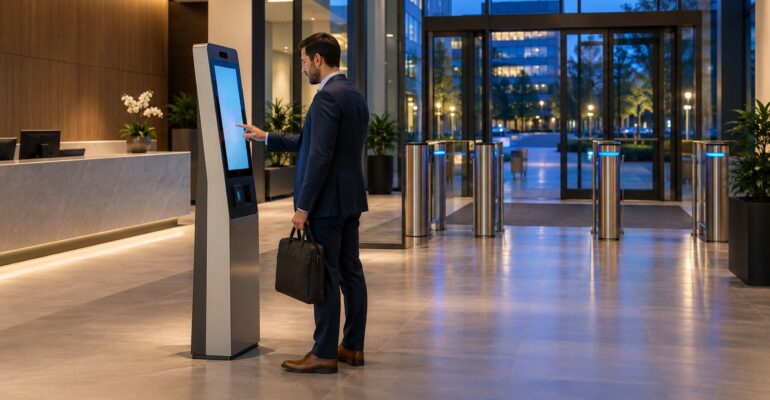
After-hours visitor check-in turns a self-service kiosk into an automated front desk. As a result, approved guests can identify themselves, notify the right person, and follow clear next steps without relying on an unattended sign-in sheet.
Sadevio supports this approach through configurable visitor management features, flexible workplace integrations, and a practical self-service kiosk experience.
Why after-hours arrivals need a defined process
Without a defined workflow, late visitors often call a general number, wait outside, or follow another employee through a door. Therefore, security teams lose visibility at the exact moment when fewer staff are present.
A clipboard does not solve the problem. It cannot confirm an expected visit, alert a host, enforce required steps, or provide live status. In contrast, a kiosk can guide each arrival through a consistent process and create a useful digital record.
Before and after automated evening check-in
Before
- Visitors search for a phone number or wait at a locked door.
- Hosts receive calls without enough identity or visit details.
- Security staff repeat manual checks for routine arrivals.
- Arrival records vary by shift, location, and employee.
After
- The kiosk finds the visit and presents the correct flow.
- Hosts receive an alert with useful arrival context.
- Required notices and approvals run in a set order.
- Every check-in creates a consistent timestamp and audit record.
Overall, automation gives guests a clear path while preserving security oversight. Staff can focus on unusual cases instead of repeating the same instructions at every late arrival.
Build the workflow around approved visits
First, encourage hosts to pre-register anyone expected outside normal reception hours. The visit record should include the guest, host, location, time window, and purpose. Consequently, the kiosk can separate an approved arrival from an unknown walk-in.
Next, choose the identity steps that match the site’s risk. A low-risk office may ask for a confirmation code and name. Meanwhile, a controlled facility may require an ID scan, host approval, or another verification step before entry.
Additionally, keep the interface simple. Guests should see what to do, who has been notified, and what happens if the host does not respond. Clear prompts reduce repeated taps, abandoned check-ins, and unsafe attempts to enter another way.
Use notifications with a clear escalation path
An arrival alert only helps when it reaches someone who can act. Therefore, route the first message to the host through the tools your team already uses. Then define a backup contact for missed or delayed responses.
For example, the system might alert the host immediately and contact an on-duty security desk after three minutes. If neither person responds, the kiosk can display a safe waiting instruction. It should never imply that an unapproved guest may proceed.
Moreover, escalation rules should vary by site and visitor type. A delivery driver may follow a designated handoff process. On the other hand, a service technician may need direct escort approval before the next step appears.
A short scenario: an evening service visit
Consider a technician scheduled to repair a conference room system at 7:30 p.m. The office manager creates the visit earlier that day. The record includes the approved entrance, host, service area, and expected departure time.
At arrival, the technician uses the lobby kiosk to confirm the visit and accept the site notice. As a result, the host receives a detailed alert instead of a vague phone call. The kiosk then explains where to wait until the host arrives.
Finally, the technician checks out at the same kiosk after the work ends. The system records the departure and closes the visit. Security can now see a complete timeline without collecting a paper sheet the next morning.
Plan for exceptions and downtime
After-hours workflows must handle unexpected conditions safely. Specifically, decide how the kiosk responds to an unknown visitor, an expired visit, a failed host response, or a network problem. Each message should direct the guest toward an approved contact or waiting area.
In addition, test the physical environment after reception closes. Check lighting, camera coverage, kiosk visibility, accessibility, and the route to the secure door. A sound digital workflow still depends on a safe and understandable lobby.
Teams should also review privacy. Show only the details a visitor needs, and avoid exposing employee directories on an unattended screen. Therefore, the kiosk can stay helpful without revealing unnecessary information.
Measure whether the process works
Track check-in completion time, host response time, abandoned sessions, manual assistance, and unresolved arrivals. For instance, frequent timeouts may reveal outdated host data or unclear messages. A high exception rate may show that pre-registration needs stronger adoption.
Meanwhile, review results by location and time window. One office may need better evening coverage, while another may struggle with early contractor shifts. Shared reporting helps leaders improve policy without treating every entrance the same.
Key takeaways
- Pre-register expected visitors before reception closes.
- Use the kiosk to guide identity, policy, and notification steps.
- Give every host alert a defined backup route.
- Keep unknown visitors in a safe, controlled exception flow.
- Review response times and abandoned check-ins regularly.
In short, after-hours visitor check-in extends a professional front desk beyond business hours. The kiosk guides approved guests and alerts the right people. At the same time, security teams retain consistent records, clear exceptions, and control of the entrance.
Ready for secure check-in after hours?
See how Sadevio can automate arrivals while keeping your entrance professional, visible, and controlled.