
Emergency Visitor Management Starts at the Kiosk
Emergency Visitor Management Starts at the Kiosk
Emergency plans fail when visitor data is incomplete at the front door. Employees may know where to go during an evacuation, but guests, contractors, and interview candidates often arrive through a manual process with missing details. As a result, teams lose time when they need accurate accountability the most.
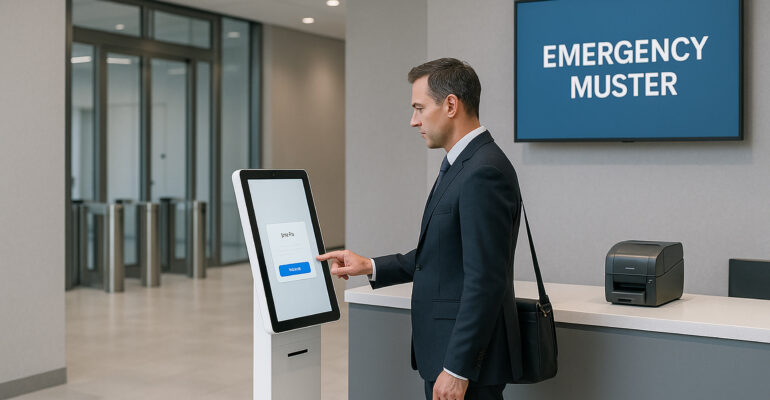
However, emergency visitor management does not start in the stairwell or at the muster point. It starts at check-in. A self-service kiosk creates a secure, consistent, and auditable front-desk workflow, so visitor records stay current before an incident, during an incident, and after the all-clear.
If you want the broader platform overview first, review Sadevio’s features, available integrations, and the live self-service kiosk demonstration.
Why manual emergency accountability breaks down
Many sites still depend on a reception desk, a paper sign-in sheet, and a badge stack. That approach looks simple, yet it creates blind spots fast. For example, a visitor may sign in with incomplete details, receive a handwritten badge, and enter the building before anyone checks where they are going.
During a fire alarm, lockdown, or facility evacuation, those gaps become operational problems. Meanwhile, security teams must answer urgent questions right away.
- Who is inside right now?
- Which host owns each visitor?
- Did the visitor finish check-in or leave early?
- Which contractors entered restricted spaces?
Therefore, the issue is not just speed. It is trust in the visitor list. If the front desk process is inconsistent, the emergency roster will be inconsistent too.
How a kiosk improves emergency visitor management
A self-service kiosk gives every visitor the same guided path. First, the system captures required details. Next, it applies policy steps, host notifications, and badge rules. Then, it logs arrival status in a searchable digital record. Consequently, teams gain a live visitor list that is easier to trust during an incident.
Moreover, kiosk workflows reduce dependence on memory. Reception staff no longer have to recall every step under pressure. Instead, the system handles repeatable tasks automatically while staff focus on exceptions, accessibility needs, and human support.
A strong emergency-ready workflow often includes:
- pre-registration lookup by name or QR code
- host assignment and instant arrival notifications
- badge printing with visitor type and time window
- safety acknowledgments for contractors or restricted visits
- digital logs that show check-in, checkout, and status changes
Example scenario: evacuation at a multi-tenant office
A multi-tenant office tower runs a busy lobby with visitors, vendors, and interview candidates. Before the site used kiosks, reception tracked arrivals in a spreadsheet and printed badges one by one. When an alarm interrupted the morning rush, security had to compare a paper log, email notifications, and host messages to estimate who might still be inside.
After moving to kiosk-based check-in, the process became far cleaner. Each visitor completed a guided flow, badge issuance tied back to a digital record, and hosts received automatic notifications. As a result, the security team could review a current visitor list within seconds and confirm missing people much faster at the muster point.
Before vs after at the front desk
Before kiosk check-in
- Visitor names are handwritten and sometimes unreadable.
- Hosts are contacted late or not at all.
- Badge records do not match sign-in records.
- Evacuation checks require cross-referencing several tools.
After kiosk check-in
- Visitor records are complete, structured, and time stamped.
- Hosts receive alerts as soon as guests arrive.
- Badge printing follows the same workflow every time.
- Emergency teams can review a cleaner, current visitor roster fast.
In short, the kiosk turns emergency accountability into a byproduct of everyday good process. That is valuable because the best emergency workflow is the one your team already uses every day.
Practical design choices that matter
Not every visitor workflow supports emergency response equally well. Therefore, teams should design the front-desk process with both daily operations and incident readiness in mind.
- Capture the right fields: collect company, host, destination, and visitor type early.
- Use clear badge logic: show status, time limits, and visitor category consistently.
- Automate host alerts: send arrivals to the right person without manual calls.
- Connect downstream systems: tie the kiosk to notification, identity, or access workflows when needed.
- Keep reporting simple: make it easy for security or facilities teams to pull a current visitor list fast.
Additionally, sites with stricter requirements can extend the same workflow to contractor briefings, restricted-area checks, and role-based approvals. That keeps the kiosk valuable for routine check-in, not just rare incidents.
What operations, facilities, and security teams gain
Emergency visitor management is often framed as a compliance task. That matters, of course, but the operational value is broader. Cleaner front-desk data helps teams reduce confusion, improve response speed, and present a more professional arrival experience at the same time.
- Security: better visibility into who is onsite and who owns the visit.
- Facilities: less lobby friction and fewer manual workarounds.
- Operations: more consistent workflows across sites and shifts.
- Visitors: a faster, clearer, more confident check-in experience.
Key takeaways
- Emergency visitor management starts with accurate digital check-in.
- Kiosks improve visitor accountability without slowing the lobby.
- Consistent badging and host alerts support faster incident response.
- Integrated workflows help teams trust the visitor roster when it matters most.
Overall, the goal is simple: make the secure path the easy path. When the kiosk becomes your automated front desk, emergency readiness improves naturally because the visitor record is already complete, current, and usable.
Ready to modernize your visitor check-in workflow?
See how Sadevio can help your team create a secure, professional, and emergency-ready automated front desk.